
Liquid Glass DesignDesign7 min read
Liquid Glass theme for iPhone, Android, Windows and web
How to get a Liquid Glass theme on iPhone (iOS 26 and 27), Android and Windows, what copycat apps can't do, and a CSS token recipe for your own glass UI.
On this page
- iPhone: the settings that change how Liquid Glass looks
- Home Screen icons (iOS 26 and later)
- The glass itself: iOS 26.1 toggle, iOS 27 slider
- Android: launchers, Good Lock and glass widgets
- Glass Launcher (formerly Launcher iOS 26)
- Samsung Good Lock: Theme Park
- KWGT glass widgets
- Liquid Glass theme for Windows 10 and 11
- For designers: building a Liquid Glass UI theme
- FAQ
- Can I download an iOS 26 Liquid Glass theme?
- Is there a dark Liquid Glass theme?
- Sources
The only place you get the real Liquid Glass theme is an Apple device on iOS 26 or later, and on iOS 27 you tune it with a slider in Settings > Appearance > Liquid Glass. Everything else (Android launchers, Samsung's Good Lock, Windows taskbar mods, web themes) imitates the look with blur and transparency, and none of the phone apps reproduce the lens-style refraction that makes Apple's version distinctive.
If you want frosted, see-through panels on a non-Apple device, there are decent options below. If you want the content behind a button to bend at the edges the way it does on iOS, you won't get that from a theme app.
People also search for "fluid glass theme" and "glassy theme". Those aren't Apple terms, and they lead to the same set of options.
iPhone: the settings that change how Liquid Glass looks
Liquid Glass shipped with iOS 26 in September 2025 and there's no separate theme to download. What you can change depends on your iOS version.
Home Screen icons (iOS 26 and later)
The Clear and Tinted icon styles are what most "iOS 26 liquid glass theme" screenshots show.
- Touch and hold an empty spot on the Home Screen until the apps jiggle.
- Tap Edit in the top left corner, then Customize.
- Pick Clear for see-through glass icons and widgets, or Tinted to color them. Clear can be paired with Light, Dark or Auto at the bottom of the panel.
Tinted has an eyedropper that samples a color from your wallpaper. If Reduce Transparency or Increase Contrast is on in Accessibility settings, Clear icons lose their see-through look, so check those first if Clear looks flat.
The glass itself: iOS 26.1 toggle, iOS 27 slider
In iOS 26.1 Apple added a two-option setting at Settings > Display & Brightness > Liquid Glass. Clear is the original look; Tinted, in Apple's words, "increases opacity and adds more contrast".
iOS 27 replaced that toggle with a slider. Go to Settings > Appearance > Liquid Glass and drag it: the left end is the most transparent, the right end gives nearly opaque buttons and search bars, and Apple's default sits in the middle. The same slider appears during device setup. Reduce Transparency (Settings > Accessibility > Display & Text Size) still exists and makes the backgrounds solid.
For the clearest version of the look, put the slider near the left end and pick a wallpaper with soft color and some texture. Glass over a flat black wallpaper has nothing to refract, so it reads as a dark gray pill.
Android: launchers, Good Lock and glass widgets
Android Authority tried several ways to make an Android phone look like iOS 26 and concluded that none could reproduce Liquid Glass refraction. Their best result was a launcher plus a glass-style widget pack. These are the options on Google Play now.
Glass Launcher (formerly Launcher iOS 26)
The app Android Authority tested as "Launcher iOS 26" is now listed as Glass Launcher by LuuTinh Developer, with over 10 million downloads. Its own listing describes the effect as "frosted glass design (glassmorphism)", which is accurate: you get blur, not refraction. It shows ads, and Android Authority found you had to watch an ad for every setting change. Search Play for "iOS launcher" and you'll find dozens of near-identical clones from other developers; read the developer name before installing.
Samsung Good Lock: Theme Park
On a Galaxy phone, Good Lock (by Samsung Electronics) is the safer route because it's Samsung's own app. Its Theme Park module added an icon Effects menu in July 2025 (version 1.1.01.23) with a Glass option and an opacity control. The path reported at the time is Good Lock > Theme Park > Icons > Effects > Glass. It only changes icons. Android Authority noted it didn't apply to every icon (the Play Store icon was one exception) and that results depend heavily on the wallpaper.
KWGT glass widgets
KWGT Kustom Widget Maker by Kustom Industries is a widget editor, and most "liquid glass widgets for Android" are preset packs that run inside it. One example is Glass Widgets: Liquid Glass by Aionyxe. Packs like this usually need the paid KWGT Pro key, so check the listing before paying for either. If you'd rather build your own, KWGT's blur and mask tools get you frosted cards that match your wallpaper.
Avoid "liquid glass theme APK" downloads from file mirrors. Everything in this section is on Google Play or comes from Samsung, which is where you should get it.
Liquid Glass theme for Windows 10 and 11
Microsoft hasn't added anything like Liquid Glass. In posts on X covered by Windows Latest in August 2026, Microsoft design director March Rogers said "we won't be making immediate changes to the transparency options already in Windows" and pointed to what the community already provides.
These are the options, from least to most invasive. All of them are variations on blur and tint; none refract.
- Native materials. Windows 11 apps can use Mica (an opaque material tinted by your wallpaper) and Acrylic (a blurred, translucent one). Both depend on Settings > Personalization > Colors > Transparency effects being on. Windows 10 has the same transparency toggle with a more limited effect.
- TranslucentTB. A free, open-source utility that makes the taskbar clear, blurred or acrylic. It runs on Windows 10 and 11 and is distributed through the Microsoft Store. This is the simplest answer to "liquid glass theme for Windows 10".
- Windhawk mods (Windows 11). The Windows 11 Taskbar Styler mod has a community theme catalog in the taskbar styling guide that includes themes named LiquidGlass, OS26 Liquid Glass, FrostyGlass and TintedGlass. These are blur and tint styles applied to the taskbar's UI tree. Mods patch running system processes, so expect breakage after Windows updates.
For designers: building a Liquid Glass UI theme
If you want a glass theme for your own product or site, define it as a small set of tokens you can tune one at a time. Apple's material does a lot automatically (adaptive tint, specular response to motion, refraction near edges), and on the web you rebuild each of those yourself.
A minimal token set in CSS:
:root {
  --glass-tint: rgb(255 255 255 / 0.14);
  --glass-blur: 14px;
  --glass-saturate: 160%;
  --glass-edge: rgb(255 255 255 / 0.35);
  --glass-specular: rgb(255 255 255 / 0.55);
  --glass-shadow: 0 8px 24px rgb(0 0 0 / 0.18);
  --glass-radius: 22px;
}

@media (prefers-color-scheme: dark) {
  :root {
    --glass-tint: rgb(20 20 24 / 0.32);
    --glass-edge: rgb(255 255 255 / 0.18);
    --glass-specular: rgb(255 255 255 / 0.30);
  }
}

.glass {
  background: var(--glass-tint);
  -webkit-backdrop-filter: blur(var(--glass-blur)) saturate(var(--glass-saturate));
  backdrop-filter: blur(var(--glass-blur)) saturate(var(--glass-saturate));
  border-radius: var(--glass-radius);
  box-shadow:
    inset 0 1px 0 var(--glass-specular),
    inset 0 0 0 1px var(--glass-edge),
    var(--glass-shadow);
}

@media (prefers-reduced-transparency: reduce) {
  .glass {
    background: rgb(240 240 244 / 0.94);
    -webkit-backdrop-filter: none;
    backdrop-filter: none;
  }
}
What each token does, and the mistakes it prevents:
- Tint is the main legibility control. Keep it low in light mode and raise it in dark mode, because dark glass over dark content disappears faster than light glass over light content.
- Saturate makes the colors behind the panel richer instead of muddy. Apple's glass does this, and most imitations skip it.
- Edge and specular are two separate inset highlights. A 1px edge ring defines the shape; a brighter top highlight suggests a light source. Drop either and the panel reads as frosted plastic.
- Shadow should stay soft. A hard drop shadow fights the idea that the material is thin.
- Plan the reduced-transparency fallback early.
prefers-reduced-transparencyonly works in Chromium (118 and later) today, and Safari ignores it, so if accessibility matters for your product, also offer an in-app "solid panels" switch that applies the same solid background.
backdrop-filter works unprefixed in Chrome 76+, Firefox 103+ and Safari 18+. For actual refraction you need an SVG displacement filter or WebGL. The Liquid Glass SVG filters and real liquid glass for the web resources on this site show both approaches. SVG filters inside backdrop-filter render in Chromium, Safari doesn't apply them (WebKit bug 245510), so keep the blur tokens above as the fallback.
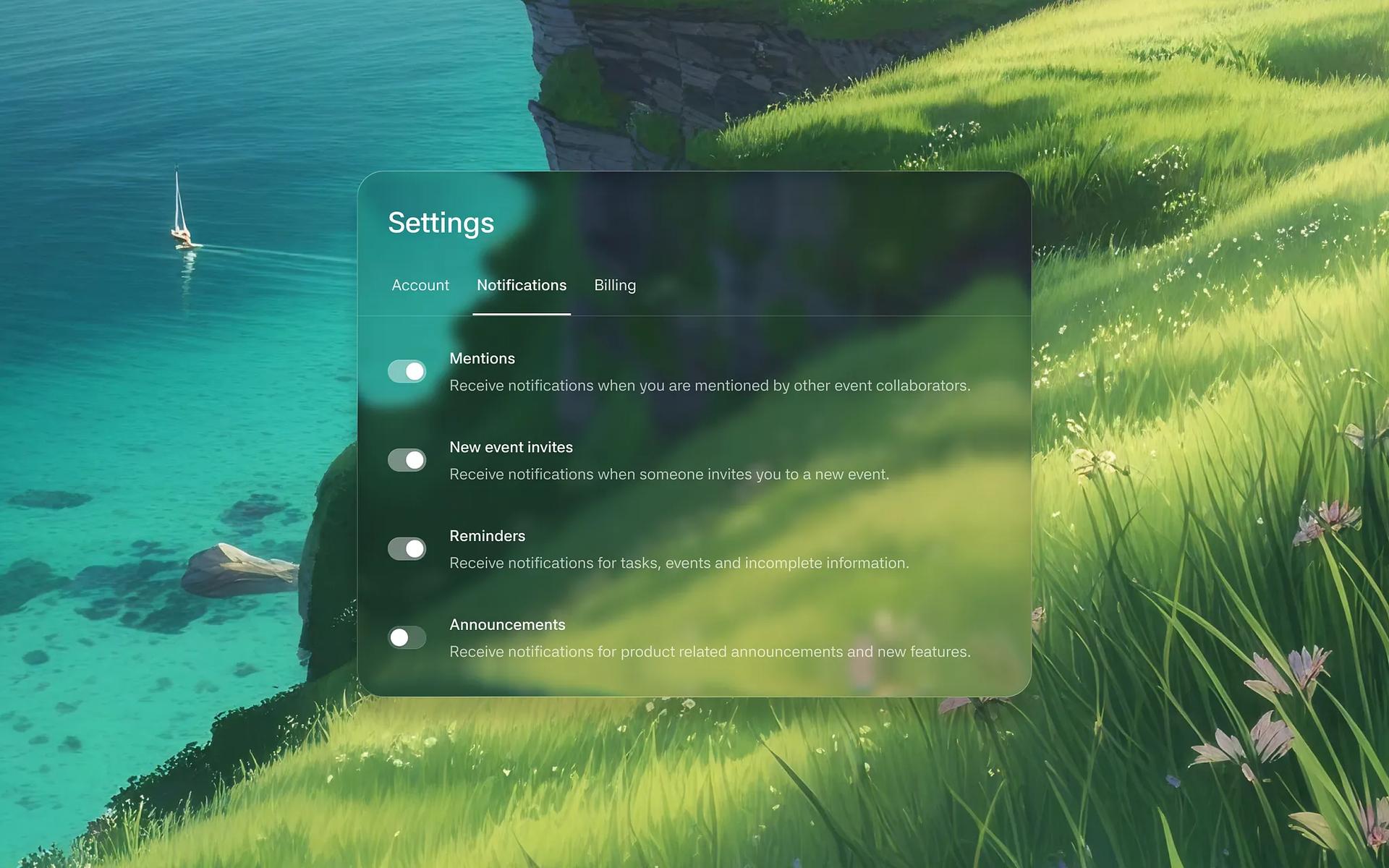
Two gallery pieces show the token logic well. Settings - iOS Liquid Glass by Sithum Lahiru puts a full settings screen over a coastal landscape, which is the hardest legibility case, and the designer shares the Figma file.
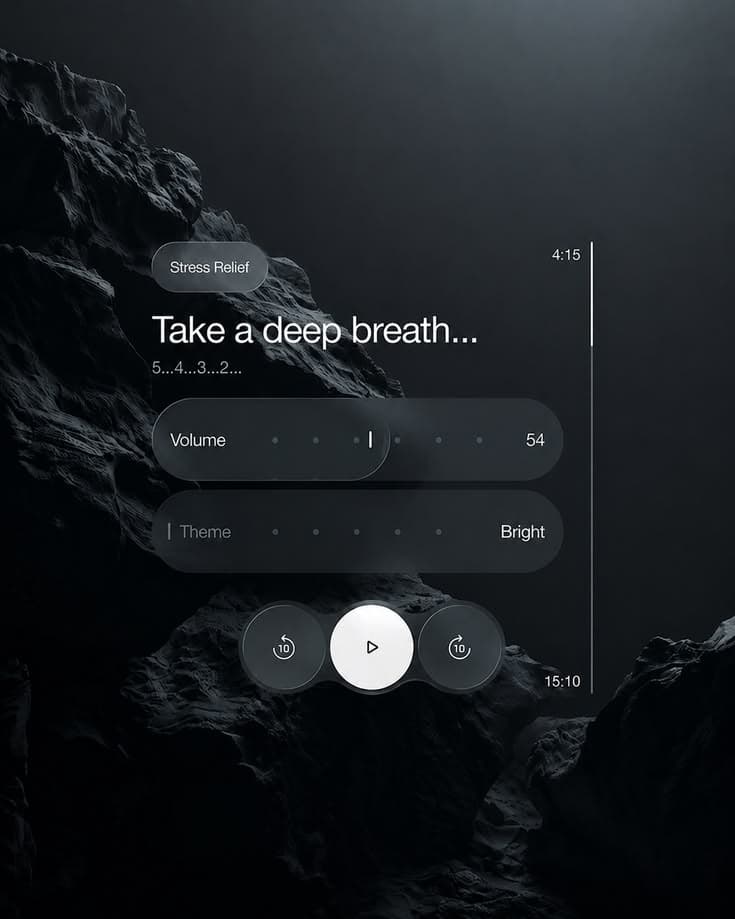
Minimal Dark UI Concept for a Mindfulness App by Moiz is a good reference for dark mode, where the glass is carried by lighting more than by tint.
For a light and dark pair of the same control, see Liquid Glass Button iOS 26 - Light & Dark by Outline.

If you're generating mockups with AI first, every item in the gallery has a style prompt you can copy, and they're collected on the prompts page. The explainer on what Liquid Glass is covers how refraction differs from glassmorphism blur, which is the part most themes get wrong.
FAQ
Can I download an iOS 26 Liquid Glass theme?
No. Liquid Glass ships with iOS 26 and later, and there's no separate theme file to download. What you can change is the Clear or Tinted icon style on the Home Screen and the Liquid Glass setting (a toggle in iOS 26.1, a slider in iOS 27). Downloads that promise the theme for other phones are blur-based imitations, and APKs from file mirrors are best avoided.
Is there a dark Liquid Glass theme?
On iPhone, choose Clear in the Home Screen Customize panel and set it to Dark. For your own UI, the token set above has a dark-mode override that raises the tint and lowers the edge and specular highlights.
Versions, settings and figures checked on 14 November 2026.
Sources
- https://9to5mac.com/2026/06/15/ios-27-adds-new-liquid-glass-slider-on-iphone-heres-what-it-lets-you-do/
- https://www.iclarified.com/102307/how-to-turn-off-liquid-glass-transparency-on-iphone-video
- https://www.macrumors.com/2025/10/20/ios-26-1-liquid-glass-toggle/
- https://techcrunch.com/2025/09/24/how-to-customize-your-iphone-home-screen-for-ios-26s-liquid-glass/
- https://9to5mac.com/2025/08/27/how-to-make-iphone-app-icons-clear-with-ios-26/
- https://www.androidauthority.com/how-to-make-android-look-like-ios-26-3571274
- https://www.androidauthority.com/good-lock-theme-park-effects-menu-3578475/
- https://androidsage.com/2025/07/18/good-lock-update-ios-26-liquid-glass-effect-samsung-one-ui
- https://play.google.com/store/apps/details?id=com.luutinhit.launcherios
- https://play.google.com/store/apps/details?id=com.samsung.android.goodlock
- https://play.google.com/store/apps/details?id=org.kustom.widget
- https://play.google.com/store/apps/details?id=com.aionyxe.vision
- https://windowslatest.com/2026/08/10/microsoft-reveals-why-windows-11-wont-get-liquid-glass-style-ui-even-though-windows-vista-did-it-first-with-aero/
- https://learn.microsoft.com/en-us/windows/apps/design/style/mica
- https://github.com/TranslucentTB/TranslucentTB
- https://github.com/ramensoftware/windows-11-taskbar-styling-guide
- https://caniuse.com/css-backdrop-filter
- https://bugs.webkit.org/show_bug.cgi?id=245510
- https://developer.mozilla.org/en-US/docs/Web/CSS/@media/prefers-reduced-transparency